
Dentro de este Blog podrás encontrar muchos noticias del mundo Tecnológico, manuales, vídeos, fotos y mas.
Mostrando entradas con la etiqueta android. Mostrar todas las entradas
Mostrando entradas con la etiqueta android. Mostrar todas las entradas
6 de septiembre de 2012


Amazon presentará su primer smartphone hoy
Amazon presentará su primer smartphone hoy:
Desde el año pasado se ha conocido que Jeff Bezos, fundador de ese gigante de las ventas por internet Amazon, apuesta por los dispositivos móviles como un mercado de gran importancia, lo que ha demostrado con el lanzamiento primero de sus tan exitosos dispositivos para leer libros electrónicos, los Kindle, y luego con su primera tablet, la Kindle Fire. El siguiente paso lógico sería un smartphone.

Pues los chicos de The Verge han recibido confirmación por parte de sus fuentes en Amazon de que esta empresa presentará su propio smartphone hoy mismo, durante el evento que tienen planeado para dentro de algunas horas en los Estados Unidos.
Este móvil llegaría con una capa personalizada del sistema operativo Android 4.0 Ice Cream Sandwich, optando por mostrar y ofrecer la mayoría de servicios web de Amazon, tales como su propia tienda de aplicaciones (la cual está disponible en España desde hace un par de semanas), su servicio de música y su servicio de películas y vídeos, entre otros, por lo que no tendrá la tienda Google Play instalada.
Si siguen la misma tendencia del Kindle Fire, este móvil contaría con un hardware de gran potencial y un precio muy bajo, para así enamorar a los consumidores y que su impacto en el mercado se note con fuerzas.
Sin embargo, lo que veríamos hoy podría ser un prototipo aún en desarrollo, pero sin duda Jeff Bezos no dejaría pasar por alto la oportunidad de vender en navidades, así que seguramente saldría a la venta en algún momento durante Q4 2012.
Un smartphone de Amazon supone un gran competidor en el mercado, tanto para las otras plataformas como para el mismo Google, sino solo debemos recordar porqué Amazon es el verdadero enemigo de Google.
Samsung’s Galaxy S3 Sales Reach 20 Million in Only 100 Days Since May Launch
Samsung’s Galaxy S3 Sales Reach 20 Million in Only 100 Days Since May Launch:
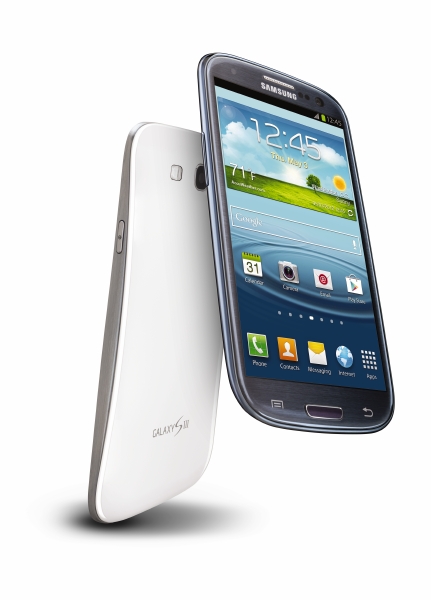
I would like to express my sincere appreciation to customers who have chosen the GALAXY S III. We will never stop providing the latest smart mobile technologies to help users live a life extraordinary.Now all they have to do is get us some Jelly Bean love and we’ll send a thank you right back.
Via: Samsung
At 57.5%, Gingerbread Still The Top Android OS; Jelly Bean Climbs To 1.2%
At 57.5%, Gingerbread Still The Top Android OS; Jelly Bean Climbs To 1.2%:

New data on the state of the Android ecosystem has been posted to Google’s Android Developers site. The big reveal? Gingerbread, the version of the Android mobile operating system released back in December 2010, is still leading with 57.5% of Android OS share. Android 4.0 (Ice Cream Sandwich) is at 20.9%, and Android 2.2 (Froyo) has 14%. Yes, Froyo – released in May 2010. And as for the newest version of Android, aka Jelly Bean (Android 4.1)? It’s now installed on 1.2% of Android devices, up from 0.8% a month ago.
Since Google only revealed Jelly Bean in late June, promising rollouts to Nexus handsets and the Motorola Xoom in mid-July, the number of Jelly Bean devices can also help paint a picture of new Android device sales, and perhaps most importantly the early traction the Jelly Bean-based Nexus 7 tablet is seeing. (Maybe that’s why Google opted for the giant Google.com homepage ad?)
Also, despite the new device announcements at Motorola’s press event yesterday, Jelly Bean’s traction doesn’t look to immediately improve. Even though Google completed the acquisition of the handset maker Motorola Mobility earlier this year, Motorola’s new phones (the Droid RAZR HD and Droid RAZR MAXX HD and Droid RAZR M) aren’t shipping with Jelly Bean. This news, of course, comes with a sigh of relief from competing OEMs who feared that Motorola would be given an unfair advantage now that it’s Google-owned in terms of getting the latest OS ahead of the pack. Nope.
Instead, Motorola promised that it would attempt to upgrade both new and existing handsets to Jelly Bean soon. But it also went a step further - promising a $100 credit if it failed to do so after consumers purchased one of its newest Android phones. (More details on that here.)
To be fair, Jelly Bean’s small install base isn’t a great reflection of consumer demand for Android devices. Because Android updates are in the hands of OEMs and carriers, users can’t follow the upgrade path to newer software releases the way that Apple iOS device owners can simply download updates over-the-air or via iTunes. But that also makes things challenging for the Android developer community, which has to deal with different screen sizes, device types, and API versions, in addition to variations in Android OS versions. Plus, we should note that the fallout from Apple’s landmark court win against Samsung has yet to really come into play, either. Will Google begin to workaround the infringement issues by redesigning parts of Android to work differently? And, if so, how will that impact the Android fragmentation problem even further? It’s too soon to tell, but the issue of Android OS fragmentation at least, doesn’t look to be getting any better with the release of Google branded tablets and the Motorola buyout.
Facebook Closes Instagram Acquisition, Instagram Announces 5B Photos Shared
Facebook Closes Instagram Acquisition, Instagram Announces 5B Photos Shared:

Facebook has officially closed its acquisition of Instagram as of today, the companies announced. In two separate posts on their official corporate blogs, the now-joined companies talked about how they’re looking forward to what comes next for both, and Instagram highlighted a new milestone of over 5 billion photos shared through its service.
From the Instagram blog post:
What makes this even more exciting is that our deal with Facebook has closed, which means we can now work together to evolve and build a better Instagram for everyone. While our team is making the short move to the Facebook offices, Instagram isn’t going anywhere. The Instagram app and its features will stay the same one you know and love, and we’ll keep working together to build a better Instagram for everyone.From the Facebook blog post:
As we said from the beginning, we are committed to building and growing Instagram independently. Instagram will continue to serve its community, and we will help Instagram continue to grow by using Facebook’s strong engineering team and infrastructure. We also can’t wait to work with the talented Instagram team to improve the mobile experience.Facebook originally announced to the world its intention to acquire Instagram back in April, for the eye-catching price of $1 billion in a combined cash and stock arrangement. The acquisition came hot on the heels of Instagram’s expansion to the Android platform, where it began accumulating new users rapidly, adding one million in just a matter of hours and growing to 40 million in total across both of its apps in just 10 days.
Clearly, Facebook saw the opportunity in a mobile-only service that was growing its user base at a faster rate than the older social network ever had. The company reiterated today that it will be continuing to grow the business separate from Facebook itself, but also spoke a lot about “new experience” the two can “build together,” and you just know TechCrunch will be looking for a way to translate Instagram’s continued rapid growth to give Facebook some new mojo.
This deal got approval from both the FTC and the California Department of Corporations in late August, so it isn’t surprising that it’s been finalized after passing those necessary steps. Still, it’s a little exciting (and potentially worrying to dedicated Instagram fans) to think about what comes next on the product side now that the two are officially one.
Amazon's Appstore for Android tops 50,000 apps ahead of today's event
Amazon's Appstore for Android tops 50,000 apps ahead of today's event: 
Amazon's Appstore has passed the all-important 50,000 app mark after less than 18 months. The retail giant launched the Appstore back in March last year as a precursor to the November release of its Kindle Fire tablet, luring in Android users with exclusive and free app promotions. It surpassed 30,000 apps six months ago and, according to the official store figures, now offers 50,505 Android apps.
Although we recently confirmed an Amazon smartphone is in the works, the company is widely expected to launch a pair of Kindle tablets today — so how many of those 50,505 apps are going to be compatible with the new tablets? The Appstore lists 31,429 as being Kindle Fire compatible — a very healthy figure, but many of those apps may not optimized for tablets
Amazon's Appstore has passed the all-important 50,000 app mark after less than 18 months. The retail giant launched the Appstore back in March last year as a precursor to the November release of its Kindle Fire tablet, luring in Android users with exclusive and free app promotions. It surpassed 30,000 apps six months ago and, according to the official store figures, now offers 50,505 Android apps.
Although we recently confirmed an Amazon smartphone is in the works, the company is widely expected to launch a pair of Kindle tablets today — so how many of those 50,505 apps are going to be compatible with the new tablets? The Appstore lists 31,429 as being Kindle Fire compatible — a very healthy figure, but many of those apps may not optimized for tablets
5 de septiembre de 2012
Droid RAZR M hands-on
Droid RAZR M hands-on:

The runt of the RAZR litter is the much-rumored RAZR M, a device that's easy on the budget without skimping on many specs. You've got the same super-fast S4 procesor here, along with ICS (Jelly Bean's coming), 1 GB of RAM, and 8 MP camera. The main difference here is size: the footprint is considerably smaller than the RAZR HD and Maxx HD, a conscious effort by Motorola to engage those who aren't always looking for the biggest display.
Interestingly enough, despite the smaller footprint, the screen is only shrunk by a few tenths of an inch, down from the 4.7 inches on the RAZR HD and MAXX to 4.3 inches. With that comes lower resolution: we've only got qHD here on the M, but don't let that fool you. This display looks really great, and a welcome sacrifice for the $99 pricetag.
The M is up for presale today at 5 p.m. Eastern, and we're walking home with one, so sit tight for a full review in the coming week. Until then, enjoy some hands-on shots below.
The runt of the RAZR litter is the much-rumored RAZR M, a device that's easy on the budget without skimping on many specs. You've got the same super-fast S4 procesor here, along with ICS (Jelly Bean's coming), 1 GB of RAM, and 8 MP camera. The main difference here is size: the footprint is considerably smaller than the RAZR HD and Maxx HD, a conscious effort by Motorola to engage those who aren't always looking for the biggest display.
Interestingly enough, despite the smaller footprint, the screen is only shrunk by a few tenths of an inch, down from the 4.7 inches on the RAZR HD and MAXX to 4.3 inches. With that comes lower resolution: we've only got qHD here on the M, but don't let that fool you. This display looks really great, and a welcome sacrifice for the $99 pricetag.
The M is up for presale today at 5 p.m. Eastern, and we're walking home with one, so sit tight for a full review in the coming week. Until then, enjoy some hands-on shots below.
31 de agosto de 2012
Evernote for Android update brings useful notifications to Jelly Bean users
Evernote for Android update brings useful notifications to Jelly Bean users:

As Evernote moves in on the business market and shows paper fans some love, the company is also letting Android users know they haven't been forgotten with a new update. Version 4.2 of the app went live in the Google Play store yesterday, and adds convenient notifications integration for Android 4.1 users. The pull-down menu now displays thumbnails and a small text excerpt, and you can share and edit a note directly from the notification. The app also groups similar notifications automatically, and the update included various performance tweaks and bug fixes. The free update is available now in the Google Play store, but the new features are for Jelly Bean users only.
Via: The Verge
29 de agosto de 2012
Jelly Bean pre-release for Verizon Galaxy Nexus now available from Google

For experienced users who've already installed a custom recovery utility such as ClockworkMod Recovery, the process couldn't be easier. Naturally, if you're already on a custom build, you should perform a data wipe within the recovery utility, then install the IMM76Q package and then flash the JRO03O build on top of that. Regardless of your experience level, anyone with the proper motivation should be able to pull this one off. Those starting at square one will find a complete list of instructions at the source link below.
Permalink
 Android Central |
 Android Central forums |
Nuevo servicio de configuración y ayuda en la Apple Online Store
Hoy no hemos encontrado una sorpresa en la Apple Online Store y es que Apple acaba de incluir un nuevo servicio en su página web.

Este nuevo servicio online da la opción de chatear en directo con un especialista o si se prefiere un contacto más directo, solicitar que un experto te llame por teléfono. Además se podrá efectuar una visita guiada en directo. Otra de las características que se incluyen es la posibilidad de realizar una sesión posterior con un especialista que ayudará en la configuración del nuevo dispositivo (únicamente iPhone o iPad).
Cuando el cliente recibe el nuevo producto que ha comprado en la Apple Online Store, los especialistas estarán a su disposición para ayudar vía online a instalar y configurar correctamente su terminal (configurar el correo electrónico, sincronizar los contenidos con iCloud). Para tener acceso a esta sesión, el cliente ha tenido que adquirir su iPad o iPhone seleccionando la opción “Preguntar Ahora” durante su proceso de compra.
Una gran solución para todos aquellos usuarios que se adentran en el universo Apple.
from AppleWeblog
Este nuevo servicio online da la opción de chatear en directo con un especialista o si se prefiere un contacto más directo, solicitar que un experto te llame por teléfono. Además se podrá efectuar una visita guiada en directo. Otra de las características que se incluyen es la posibilidad de realizar una sesión posterior con un especialista que ayudará en la configuración del nuevo dispositivo (únicamente iPhone o iPad).
Cuando el cliente recibe el nuevo producto que ha comprado en la Apple Online Store, los especialistas estarán a su disposición para ayudar vía online a instalar y configurar correctamente su terminal (configurar el correo electrónico, sincronizar los contenidos con iCloud). Para tener acceso a esta sesión, el cliente ha tenido que adquirir su iPad o iPhone seleccionando la opción “Preguntar Ahora” durante su proceso de compra.
Una gran solución para todos aquellos usuarios que se adentran en el universo Apple.
from AppleWeblog
Cómo ser un Genius de Apple. Se filtra el libro que Apple entrega a los futuros genios
Cómo ser un Genius de Apple. Se filtra el libro que Apple entrega a los futuros genios:

Todos conocemos la Geniur Bar de las Apple Store, allí es donde nos atiende el personal de Apple pero no uno cualquiera. Para Apple ellos son los Genios, los empleados más capacitados y entrenados para ser capaces de resolver cualquier problema que un usuario presente con su Mac, iPhone, iPad o iPod.
Pues bien, Gizmodo se ha hecho con el manual que prepara a estos empleados. Para muchos cualquier material sobre la formación o relacionado con los aspectos internos de la empresa es siempre de interés. En el libro donde entrenan a los futuros Genios podemos encontrar detalles que seguramente muchos no pensaban ver.

Para empezar el libro está más orientado a la relación empleado-cliente que en aspectos técnicos que es lo que muchos pensarían. En él se muestran situaciones que se pueden presentar en las que hay que intentar mostrar empatía hacía el cliente. Y por supuesto nunca usar palabras que como problema, fallo, cuelgue, etc… Palabras que podrían hacer que el cliente tuviese una visión negativa de un producto con precio alto.
A mi no me ha resultado nada extraño el contenido. Es más, dentro del progama ASTO (Apple Sales Training Online) ya se puede apreciar el uso de dichas técnicas de venta y atención. Técnicas que en Estados Unidos saben llevar a cabo de manera eficiente como grandes vendedores que han sido siempre.
Con esto lo que sí queda claro es que si quieres trabajar en una Apple Store hay tres cosas que buscarán en ti y una de ellas es tu capacidad de ofrecer soluciones al cliente.
Más información | Gizmodo

Todos conocemos la Geniur Bar de las Apple Store, allí es donde nos atiende el personal de Apple pero no uno cualquiera. Para Apple ellos son los Genios, los empleados más capacitados y entrenados para ser capaces de resolver cualquier problema que un usuario presente con su Mac, iPhone, iPad o iPod.
Pues bien, Gizmodo se ha hecho con el manual que prepara a estos empleados. Para muchos cualquier material sobre la formación o relacionado con los aspectos internos de la empresa es siempre de interés. En el libro donde entrenan a los futuros Genios podemos encontrar detalles que seguramente muchos no pensaban ver.

Para empezar el libro está más orientado a la relación empleado-cliente que en aspectos técnicos que es lo que muchos pensarían. En él se muestran situaciones que se pueden presentar en las que hay que intentar mostrar empatía hacía el cliente. Y por supuesto nunca usar palabras que como problema, fallo, cuelgue, etc… Palabras que podrían hacer que el cliente tuviese una visión negativa de un producto con precio alto.
A mi no me ha resultado nada extraño el contenido. Es más, dentro del progama ASTO (Apple Sales Training Online) ya se puede apreciar el uso de dichas técnicas de venta y atención. Técnicas que en Estados Unidos saben llevar a cabo de manera eficiente como grandes vendedores que han sido siempre.
Con esto lo que sí queda claro es que si quieres trabajar en una Apple Store hay tres cosas que buscarán en ti y una de ellas es tu capacidad de ofrecer soluciones al cliente.
Más información | Gizmodo
9 de julio de 2012
Cómo remover el DNS con Virus de tu Computador
Toma acción inmediata para salvar tu computadora y su data si hay algún indicio que indique que tu euipo esta infectado con el DNS Changer.. Si el Check-up site dice que estas afectado, sigue las instrucciones o corre alguna de estas herramientas gratis para remover el DNS Changer o virus por el estilo:
PASO #1: Entra a este sitio http://dns-changer.eu/en/check.html y haz un scan de tu computadora. SI te dice que no esta infectada con el DNS Changer Malware, no tienes que hace nada más que alegrarte. Si te dice que sí esta infectada usa estas herramientas.
PASO #1: Entra a este sitio http://dns-changer.eu/en/check.html y haz un scan de tu computadora. SI te dice que no esta infectada con el DNS Changer Malware, no tienes que hace nada más que alegrarte. Si te dice que sí esta infectada usa estas herramientas.
| Name of the Tool | URL |
| Hitman Pro (32bit and 64bit versions) | http://www.surfright.nl/en/products/ |
| Kaspersky Labs TDSSKiller | http://support.kaspersky.com/faq/?qid=208283363 |
| McAfee Stinger | http://www.mcafee.com/us/downloads/free-tools/stinger.aspx |
| Microsoft Windows Defender Offline | http://windows.microsoft.com/en-US/windows/what-is-windows-defender-offline |
| Microsoft Safety Scanner | http://www.microsoft.com/security/scanner/en-us/default.aspx |
| Norton Power Eraser | http://security.symantec.com/nbrt/npe.aspx |
| Trend Micro Housecall | http://housecall.trendmicro.com |
| MacScan | http://macscan.securemac.com/ |
| Avira | http://www.avira.com/en/support-for-home-knowledgebase-detail/kbid/1199 Avira’s DNS Repair-Tool |
Cómo puedo usar estas herramienta para estar más seguro?
Con los enlaces anteriores seguramente resolverás tu problema. Aqui te damos algunas herramientas y sitios de ayuda para controlar y detectar malwares que muchas veces impiden que hagas actualizaciones. COn estas herramientas quitarás todos los bloqueos que tu PC pueda experimentar.| Guías | Como usarlos | Lenguaje |
| http://www.microsoft.com/es-xl/security/default.aspx | Microsoft's authoritative portal for all their security guidance, tools, and capabilities. | Spanish |
| Apple's Security Page with pointers to keep your MAC safe | Scroll down to the section on "Checking Security in your System." This has the pointers to insure your MAC is as secure as possible. | English |
| DSL Report’s Security Cleanup FAQ | A community driven self help guide to fix malware problems on your systems. | English |
| Andrew K’s Malware Removal Guide | Andrew K is an individual who share's his experience on-line. This guide is an often referenced guide to remediate malware problems on a computer. | English |
| Public Safety Canada’a Malware Infection Recovery Guide | The Canadian Public Safety office (publicsafety.gc.ca) has a malware removal guide updated and focused to help the general population. | English |
| Australia’s Stay Smart Online Factsheet to help Remove Malware | Stay Smart Online Factsheet 11, Part 1 - You suspect your computer is infected with malicious software - what should I do? |
Via: El Guru Digital
25 de junio de 2012
22 de junio de 2012
Flipboard en Android disponible - Reseña
El día de ayer en la noche salio Flipboard de la versión Beta de Android a la versión oficial y estable 1.8.4 para los dispositivos Android que les menciono.

Sinceramente nunca fui fan de flipboard ya que hasta con la ultima actualizacion no es aun un lector de Feeds que es lo que a mi me gusta y por eso uso mucho Google reader en mi Mac y en mi Nexus.
A pesar de esto Flipboard a realizado un gran trabajo integrando la mayoría o las mejore redes sociales en su nueva versión para Android. dentro de las cuales están las siguiente:


Como podrán ver tiene casi todas las redes sociales mas importantes o mas usadas como Twitter, Google+, Facebook, Yuotube, Instagram, Linkedin, Flickr, Tumblr, etc, etc.
Cuando tu ingreses datos de tu usuario y contraseña de estas redes sociales, te permitirá compartir, comentar, +1, Like, Love dentro de cada red social, dependiendo de donde estés.
Así en el caso de Facebook, te permitirá: Crear un nuevo post donde podrás agregar una foto de tu librería o tomarla con la cámara, dar Like en la historia que este leyendo de tus amigos o de Fan Pages que tengas, comentar y compartirlo dentro de la misma red social o compartir con otra app que tengas o el link directo. Así mismo como agregar esa historia dentro de tu Flipboard board


De igual manera que en Facebook, en Google+ de igual manera, te permite comentar en las entradas de las personas que están en tus círculos, dar +1, compartir dentro de la misma red o con otros apps, compartir así mismo con leer esto luego.


Ingresando a la parte de Instagram podrás ver las fotos y dar Love, comentar y compartir como les comente anteriormente con la misma red social y con otros apps que tengas instalados.

Cada red social que tengas agregada tiene su particularidad y con Twitter pues es una de ellas, en la que puedes hacer reply a un tweet, RT un Tweet con o sin comentar, marcarlo como interesante (en todas las redes), enviarlo para leer mas tarde, etc.


YouTube la red social segunda mas visitada también esta en Flipboard, en donde podemos dar like, +1 a los vídeos, comentar, compartir y suscribirse al canal. Así mismo esta visto que podrás reproducir los vídeos, no dentro de la misma App pero se te abrirá el App de Youtube en tu Android Phone


Google Reader que es una de las características que YO uso mucho en mi android smartphone para leer noticias y compartir las, es una de las board que mas usare en Flipboard y que me esta empezando a gustar mucho, lo que no veo es que tenga los mismo feed ordenados como los tengo en Google reader pero por allí vamos.


Y pues las mismas características que vienen por default en Flipboard que anteriormente ya había mencionado con las anteriores redes sociales.
Dentro de las conflagración que tenemos de Flipboard, tenemos una feature interesante que se la ve en Google+ website, que es Waht is Hot on Google+ que Flipboard lo tiene como Best of Google+ donde encontraras varios temas


Como también deseas tener un orden dentro de tus board, Flipboard te permite ordenarlas a tus disposicion, simplemente moviéndolas de un lugar. Para esto debemos de mantener por un momento aplastado el board y comenzaran a tener un efecto parecido al de iPhone cuando deseas mover tus apps. También puedes ordenarlos dentro de las conflagraciones. Eliminar es una de las opciones que también están en las opciones


Ahora si pasando directo a las conflagraciones, podremos seguir agregando mas feed de otros sites recomendados por Flipboard o simplemente buscarlos. Flipboard te presenta un menú divido en intereses, como tecnología, cocina, noticias, moda, etc, etc
La guia de contenido que te presentan los podrás escoger dependiendo de tu idioma o país.
Las actualizaciones que realizara Flipboard de los feed podrán ser cada hora, cada 24 horas (un día) o nunca, que en este ultimo la actualizacion la tendrás que realizar manualmente.
El Cache te permite tener varias opciones así como guardarlo en tu memoria externa o interna, cuanto cache deseas guardar (32MB - 512MB) y la opción de borrar cache.


Espero les guste este Review de Flipboard para Android. Si tienes preguntas, comentarios no dudes en enviarmelas.
16 de abril de 2012
AOKP Rom Build 32 ya disponible maguro/toro

Fixes:
- Fix NavBar showing up in landscape lockscreen
- Fix long-press resetting custom NavBar icons
- Fix incorrect bluetooth address on some devices
- Fix lockscreen events showing up 1 day before
- Fix quickunlock not allowing passwords longer than 8 chars
- Fix centered clock not showing the correct time
- Other small fixes
New Features:
- Camera: Pinch and Volume Zoom (CyanogenMod, Whitehawkx)
- General UI: Customizable rotation delay is back! (roman)
- Bluetooth: AVRCP 1.3+ support (CyanogenMod, MarcLandis)
- Lockscreen/NavBar: Allow shortcuts to specify their own icons
- NavBar: Allow tablets to use “hide NavBar” feature (Zaphod-Beeble)
- NavBar: Custom NavBar is now available for tablets as well! (Zaphod-Beeble)
- NavBar: Customizable glow color (roman)
- Quiet Hours: Configure the hours your device should be quiet and/or still (sethyx and thanks to CyanogenMod)
- Statusbar: Added ability to WeatherPanel to start a custom app (MarcLandis)
- Statusbar: Added ability to hide signal bars (hillbillyhacker)
- Statusbar: Customizable font size (Zaphod-Beeble)
- Statusbar: Customizable icon transparency (sethyx)
aries (esto es para todos los dispositivos Galaxy S): agregado el cargado rapdio a toggle
p1c: WiFi deberia trabajar correctamente
Puedes bajar el AOKP Rom Build 32 de aqui - toro LTE Galaxy Nexus
Para bajar el AOKP Rom Build 32 de aqui - maguro GSM Galaxy Nexus
Wipe extremadamente recomendado
Original post: BUILD 32
6 de marzo de 2012
Como actualizar la Android Market a Google Play 3.4.6
El día de hoy con los nuevos cambios de Android Market a Google Play, existieron muchos cambios en la Market de Books, Musica, Apps, Books etc. Si tienes un teléfono android y no quieres esperar a que te llegue la actualizacion, realiza los siguientes pasos
- Abre la android market y actualiza Google Music
- Cuando acabe de bajarse e instalarse ve a tu home screen
- Jala la barra de notificaciones y entra en Settings
- Ve a la opción de Apps
- En los Tabs selecciona Todos
- Busca Market y entra en el
- Dale click en el boton de Borrar Cache y luego en el de borrar Datos
- Regresa a tu Home Screen y abre Google Music
- Ya adentro click en el icono de la Market
- Confirma que actualizas

- Acepta los términos

- Y listo, tendrás tu nueva versión de Google Play


Suscribirse a:
Entradas (Atom)