22 de mayo de 2013

Chrome App Launcher llegará a OS X, ahora puedes probarlo mediante Chromium


Chrome App Launcher

Al parecer Google está trabajando para traer el Chrome App Launcher a OS X. Para los que no conozcáis qué es, se trata simplemente de una opción que permite nada más pulsar el icono de Chrome en OS X ver una ventana que nos da acceso a las diferentes aplicaciones de Google.
Como muestran en 9to5Mac tendremos acceso rápido a Google Drive, Gmail, Google+ y resto de aplicaciones añadidas a Chrome mediante la Chrome Web Store. Ahora mismo podemos probarlo gracias a la última versión de Chromium y un comando de terminal necesario para activarlo.
/Applications/Chromium.app/Contents/MacOS/Chromium --show-app-list
El comando que veis arriba es el que tendréis que introducir en el Terminal para activar App Launcher. A partir de dicho momento, al pulsar sobre el icono aparecerá un panel desde el que lanzar todas las aplicaciones que hayamos instalado.
Alfred
A mi personalmente no me resulta interesante pues si quiero lanzar esas web apps puedo recurrir a crear mis propias acciones a través de Alfred y lanzarlas mediante keywords. Algo que me resulta más cómodo pero bueno, toda novedad e inclusión en OS X es bien recibida.
Descargar | Chromium

from Applesfera 

Unity será gratis para iOS, Android, BlackBerry 10 y Windows Phone 8

unity android

  • Baja de USD $800 a 0.
  • Sólo la versión básica.
  • En principio para iOS y Android.

Good news everyone! o, al menos, para los desarrolladores que estaban pensando en hacer aplicaciones multiplataformas con el motor para juegos Unity, ya que ahora tenemos Unity gratis, donde antes había una cuota de USD $800 para poder licenciar la parte básica del motor de juegos. Como podrán imaginar, esto sólo aplica para la versión básica de Unity.
Para quien no sepa lo que es un motor para juegos, es una herramienta para crear los mismos, para no tener que pelearse con el motor de renderización gráfica, tener un motor de físicas o un detector de colisiones sin tener que hacer mayor esfuerzo; en definitiva, te da las cosas básicas para hacer un videojuego que, de otra forma, tendrías que hacerlo por tu cuenta, un laborioso y repetitivo trabajo que pocos desarrolladores quieren hacer ya. He aquí la importancia de tener Unity gratis: dar un espaldarazo a desarrolladores indie o estudios de juegos sin mucho presupuesto para que hagan sus creaciones usando este motor. En definitiva, lo que buscan desde la compañía con Unity gratis es "democratizar" la creación de videojuegos mucho más que nunca, según las propias palabras de la compañía.
Como es obvio, tener Unity gratis no sólo es bueno para los desarrolladores independientes, sino que es un empujón a las plataformas, todas en general, ya que una de las mayores ventajas de Unity es que puedes hacer juegos para varias al mismo tiempo, desde iOS, Android o Windows Phone hasta BlackBerry 10 o Xbox 360, es decir, es bueno también para los consumidores, ya que veremos mucha más variedad de juegos en todas las plataformas o, al menos, en iOS y Android, que son las que más interesan.
Ahora, que no es oro todo lo que reluce, ya que Unity gratis de momento sólo para Android y iOS, las otras dos plataformas que faltan, BlackBerry 10 y Windows Phone 8, vendrán luego, según han sugerido desde la propia Unity

from Celularis

iOS 7 será aún más social gracias a Flickr y Vimeo

 smartphones-mas-vendidos-de-argentina-iphone-5

  • Apple integraría profundamente Flickr y Vimeo en iOS7
  • Yahoo! ha colaborado en el iPhone desde sus comienzos
  • La integración de Vimeo buscaría compensar la perdida de YouTube

Se acerca la conferencia de desarrolladores WWDC 2013, lugar en el que esperamos que Apple presente sus novedades de cara al lanzamiento de iOS 7. Una de las sorpresas que nos tienen preparadas desde Cupertino es una mayor integración de Flickr y Vimeo en iOS 7, buscando darle un componente más social al sistema operativo móvil de Apple.
Así lo recoge Mark Gurman, quien en el pasado ha demostrado que tiene muy buenos contactos para conseguir información privilegiada de Apple. En Cupertino ya estarían probando una mayor integración de Flickr y Vimeo en iOS de cara al lanzamiento de su nueva versión. De esta manera, al igual que ocurre con Facebook y Twitter, los usuarios de dispositivos de Apple tendrían una mayor facilidad de compartir contenidos en dichos servicios.
Integración de Flickr y Vimeo en iOS 7
La integración de Flickr y Vimeo en iOS llega justo a tiempo para ambos servicios. Por un lado, Yahoo! acaba de presentar el nuevo Flickr con jugosas novedades. No solo se ha rediseñado la interfaz, ahora el servicio incluye 1TB de almacenamiento gratuito para todos los usuarios, convirtiéndose nuevamente en un servicio a tener muy en cuenta y rivalizando con la propia Instagram. La integración de Flickr en iOS le viene como anillo al dedo al servicio de Yahoo!, obteniendo soporte nativo en una de las gamas de producto más utilizadas por los usuarios.
Por otro lado tenemos a Vimeo. Todos sabemos que las relaciones entre Apple y Google no pasan precisamente por su mejor momento, a raíz sobre todo de la rivalidad entre iOS y Android. En Cupertino llevan tiempo buscando reducir su dependencia de los diferentes productos de Google y verían en Vimeo el servicio ideal para sustituir a YouTube, al que todavía da soporte a pesar de retirar la aplicación nativa de iOS.
La integración de Flickr y Vimeo en iOS 7 permitirá a los usuarios utilizar los servicios tanto desde el propio sistema operativo como en aplicaciones de terceros introduciendo nuestros datos una sola vez, evitando tener que introducir nuestro nombre de usuario y contraseña cada vez que queramos utilizar el servicio. De esta manera bastaría con pulsar sobre el video o fotografía que queremos compartir para que aparezca la opción de subirlo a ambos servicios, tal y como hacemos en la actualidad con Facebook o Twitter.
No obstante, aún es temprano para lanzar las campanas al vuelo. Todavía existe la posibilidad de que Apple cambie de idea y postponga la integración de Flickr y Vimeo en iOS 7 en caso de que no esté todo lo pulido posible. De hecho, algo similar ocurrió con Facebook en iOS 4, aunque finalmente esta integración llegó más adelante.

Integración de Flickr y Vimeo en iOS

Imagen: Talk for NYC (AP Photo/Paul Sakuma)


Aún así, Apple ya cuenta con Flickr en diferentes productos de la compañía. Tanto Mountain Lion como iPhoto o Aperture dan soporte a Flickr, por lo que la idea de extender dicho soporte a iOS 7 no es nada descabellada. Además,ambas compañías mantienen una fructífera relación desde el lanzamiento del primer iPhone allá en 2007.
Yahoo! todavía provee de servicios a iOS, en concreto la previsión meteorológica y la información de la bolsa, y la reciente actividad de su nueva CEO, Marissa Meyers, va buscando devolverle la frescura a una compañía que no pasaba por su mejor momento, frescura que puede encontrar en su asociación con Apple. A su vez, Apple sigue sustituyendo servicios de Google por los de otros competidores manteniendo el pulso a los creadores de Android por lo que en Cupertino se considera la gran traición. En cualquier caso los usuarios salimos ganando con esta mayor integración de Flickr y Vimeo en iOS 7, si finalmente se confirma.

from Celularis

5 Reasons To Upgrade to the Samsung Galaxy S4


samsung-galaxy-s4-s-health

A little while back, we played devil’s advocate and took a look a 5 reasons why you might not want to upgrade to the Samsung Galaxy S4. Now, in the interest of fairness, and because it is a pretty cool phone, we’re going to do the opposite and look at 5 reasons why you might want to pick it up after all.
You’ve seen our review, you’ve seen all the versus pieces we did comparing the Galaxy S4 to other phones, you’ve seen some tips and tricks to get the most out of it. Now, here are five of what we think are the best reasons that you might want to take home a shiny new S4.
In a hurry? Check out the video or just get the gist at the end of the article.

1.) It’s Pretty Fast

There’s no way around it: at least for now, the Samsung Galaxy S4 is quite simply one of the fastest phones on the market. How fast? Well let’s take a look at benchmarks. In our benchmark chart, the Snapdragon 600 version of the Galaxy S4 scored 25,900 while the Exynos 5 version scored even higher at 27,417.
HTC One vs Galaxy S4 benchmarks
When it comes to easily available mass-market devices, that’s as fast as they come. Now, this doesn’t mean it’s going to feel that much faster than other high end devices, but that’s because we’re beginning to reach a point where specs matter less and less. Still, if you want the fastest option on your carrier, the Galaxy S4 is a pretty safe bet.

2.) The Size Is Nearly Perfect

As part of my duties here at Android Authority, I end up handling a fairly large amount of devices. The strange thing is that, while they come in all shapes and sizes, it can be more difficult than you’d think to find one that just feels right. The Samsung Galaxy S4 is one of those devices.
Samsung Galaxy S4
The balance between screen size and overall device size can be a tricky one. Take the much-beloved Galaxy Note 2 for example: it’s huge screen is nice, but you definitely trade ease of use to get that massive screen. The Samsung Galaxy S4 on the other hand still has a screen that is large enough to comfortably watch videos while remaining small enough that one handed operation is not only possible, but easy.

3.) The Camera Is Awesome

A little over a week ago, we decided to pit the camera in the Samsung Galaxy S4 against the HTC One’s Ultrapixel camera. Both cameras put in a strong showing, but in the end, we gave the edge to the S4. Now this isn’t going to matter to everyone, but if you take a lot of photos with your phone, this is another reason you might want to take a close look at the S4.

samsung-galaxy-s4-photo-options

Ignoring the more gimmicky features like Drama Shot or Sound and Shot–you probably won’t use them even half as much as you might think–and just focusing on image quality alone, the S4 has some impressive optics. A quick web search for “best smartphone camera 2013″ will reveal quite a few people calling the Galaxy S4′s camera the best currently available. Note: we didn’t search for the best Android camera, these results were for the best phone camera. Not bad, Samsung. Not bad at all.

4.) There Will Always Be Something on the Horizon

In the last article, regarding the point that you might want to hold off on buying the S4 because of the upcoming Galaxy Note 3, many of you commented with the same response: there is always going to be a newer, better phone just around the corner. And you know what? You were right.
Samsung-Galaxy-Note-3-concept-1
While plenty of us are still very excited about the Note 3 (and other phones), there is always going to have to be a point where you stop, pick a phone and live with your choice. With that in mind, the Samsung Galaxy S4 is a great choice. With all its specs and features, there isn’t much of a chance that you’ll be telling yourself that you made a huge mistake a year from now.

5.) TouchWiz or Stock? The Choice Is Yours

Last week at Google I/O, we saw an announcement that we weren’t expecting: a “Google Edition” of the Samsung Galaxy S4 that runs stock Android. If you’re reading this site, we probably don’t need to tell you that this isn’t something you see everyday. Take that super fast hardware and combine it with stock Android, and that is (for many of us, at least) a match made in heaven.

google-io-galaxy-s4-google-edition-4

Now, we understand. There are plenty of you who would rather have Samsung’s TouchWiz UI than stock Android. That’s why this is a perfect situation: no matter which happens to be your preference, there is a version of the S4 for you. While we’d like to see this option for every phone released, right now, the S4 has a lock on it, and that alone might make it worth a buy.

Video


TL;DR

If you just want the bare bones 5 reasons to buy the S4, here they are:
  1. It’s fast.
  2. The size is just about perfect for most people.
  3. It’s got one of the best smartphone cameras around.
  4. There are always better phones coming out. Don’t let that paralyze you with indecision.
  5. It’s available with either the TouchWiz UI or stock Android. Pick your poison.
So what do you think? Is the Samsung Galaxy S4 a great buy or are you waiting for something else until you upgrade? Let us know in the comments down below!


from Android Authority 

21 de mayo de 2013

Tip: If an Android App Update is Not Showing as Available on Your Device, Install From the Web


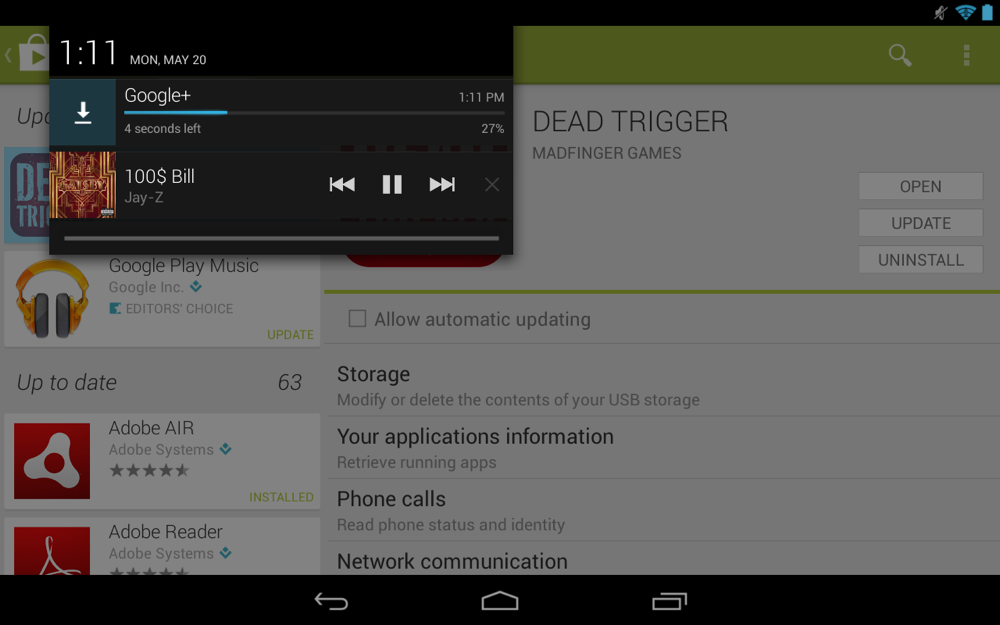
Screenshot_2013-05-20-13-11-52

How many times has a new Android app update been issued for a major app, yet you find yourself without the ability to update on your phone or tablet? All of your friends are showing off the new features, and there you are stuck in times of old, refreshing and tapping frustratingly, hoping that you’ll receive the satisfaction that accompanies the “Update” button. What if there was a way around the wait, at least in most cases? There is, actually.

I’m surprised we haven’t shared this trick in the past, but never the less, it’s time that we do. Should you know of an app update in the wild, you can almost always install it directly from the web version of Google Play even if your device isn’t showing that you have an update available. As soon as you see the Play store listing of the app change over to today’s date, meaning it was recently updated, you can tap “Install” followed by a selection of the device you wish to install the update on, before sitting back as it updates over-the-air.

Take today’s Google+ update as an example. None of my devices are showing it as being available at this time on device (pictured above), however, I installed it just fine through the web Google Play on both my HTC One and Nexus 7. Also, if you got really desperate and weren’t anywhere near a computer, I’d bet that you can do the same trick through the Chrome browser on your phone.


post from: Droid Life